
3주차 목표
- GStreamer에 대한 공부
회고
GStreamer란?
- Framework for creating streaming media applications.
- Use RTSP communication.
RTSP
- Real Time Streaming Protocol
- This is use d for systems that stream media in real time, and is used to remotely control the media server
- However, it does not transmit media streaming data directly, but uses the Real Time Protocol (RTP) to deliver data to the transport layer.
- It consists of server and client, and two-way communication is possible.
GStreamer의 구조
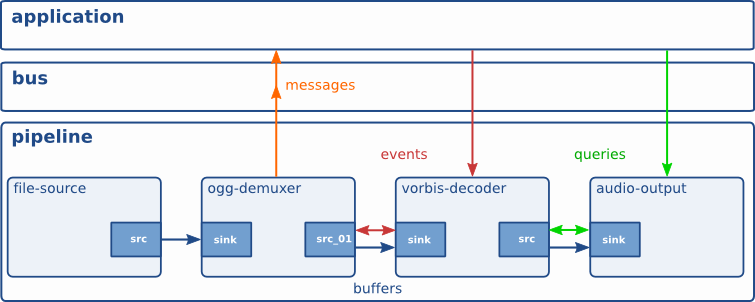
-
Elements: A module that has one function.
You can create a pipeline that connects elements to perform specific tasks.
-
Pads: It is in charge of input and output of the element, and the element can be connected through the pad. There are src, which is an input pad, and sink, which is an output pad.
The data stream flows from src to sink (downstream).
-
Bins: A container of elements.
The state of the elements can be controlled at once through the bin
-
Communication
-
Buffers: This is used to transfer data between elements in the pipeline.
Always move from src to sink
-
Events: This is used for data transfer between elements or for communication between elements and applications. It is two-way movable
-
Messages: This is transmitted by the element of the message bus.
Usually, information such as error, tag, state change, etc. is transferred from element to application.
-
Queries: The queries cause the application to request information such as duration, playback position, etc. from the pipeline.
Queries always respond synchronously.
Both upstream and downstream are possible, but upstream is usually used.
-
Exercise
- Server
gst-launch-1.0 nvarguscamerasrc sensor-id=0 # 0번 센서에 연결된 카메라를 인식하여 raw video 데이터 가져옴
! 'video/x-raw(memory:NVMM), widht=1920, height=1080, format=(string)NV12, framerate=30/1'
! nvvidconv # raw video를 위에 명시한 포맷대로 변환
! omxh264enc # Raw video 데이터를 h264 포맷으로 인코딩
! 'video/x-h264, stream-format=byte-stream'
! h264parse # h264를 parse
! rtph264pay # h264의 payload를 rtp 패킷으로 인코딩한다
! udpsink port=3000 # 3000번 포트로 송신
- Client
gst-launch-1.0 udpsrc port=3000 #receive data through port 3000
! application/x-rtp, encoding-name=H264, payload=96 #payload 96 : dynamic payload
! rtph264depay # Rtp 패킷을 위 파이프 라인에 명시된 형식에 맞게 decoding한다.
! avdec_h264 # Rtp 패킷에서 디코딩 된 h264의 데이터를 디코딩 하여 video/x-raw데이터로 변환
! nvvidconv # Decoding 된 raw video데이터를 컨버팅
! nvegltransform # nveglglessink를 사용하기 위해 메모리 타입을 memory:NVMM → memory:EGLImage로 변경
! nveglglessink # 영상 데이터를 화면에 창 형태로 표시n
self.VIDEO_SOURCE = 'udpsrc port={5600}' # port 5600 udp communication
self.VIDEO_CODEC = '! application/x-rtp, payload=96 ! rtph264depay ! h264parse ! avdec_h264'
self.VIDEO_DECODE = '! decodebin ! videoconvert ! video/x-raw,format=(string)BGR ! videoconvert'
self.VIDEO_SINK_CONF = '! appsink emit-signals=true sync=false max-buffers=2 drop=true'
