
4주차 목표
- H.264와 RTSP에 대한 조사 및 공부
회고
RTP
RTP란?
- Real Time Transport Protocol
- Server → Client one-way transmission
- Packet loss is possible because it is transmitted through UDP
-
RTP header structure
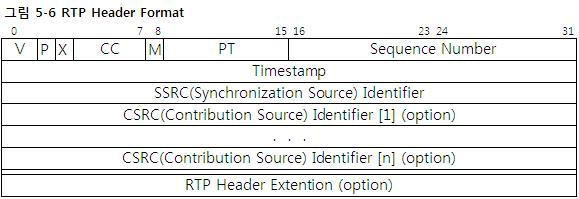
V (Version, 2 bits): Usually 2.
P (Padding bit, 1 bit): Padding bit is added at the end of the header if P is 1.
X (Extension, 1 bit): The presence of an extension header.
1 indicates that the extension header is followed
CC (CSRC count, 4 bits): The number of CSRCs.
M (Marker bit, 1 bit): ???????????
PT (Payload Type , 7 bits): The type of data contained in payload.
Client check this and decide how to play.(Video, music file, etc)
Sequence Number(16 bits): Number for guaranteeing order of packets.
Increasing by 1 each time a packet is sent.
Initial value is random
Timestamp (32 bits): The timing when the packet is played.
Put packets in a buffer of a certain size and run according to the timestamp.
Used to sync.
SSRC (SSRC ID, 32 bits): ID of the media stream source.
CSRC (CSRC IDs, 32*CC bits): Id of sources utilized in the media.
RTSP
RTSP란?
- Real Time Steaming Protocol
- Application layer protocol for controlling real-time data transmission.
- Using port 554.
- It is text-based in the Request/Response method → similar with HTTP
- Both TCP and UDP are available, but typically TCP is used.
- It does not transmit streaming data itself. It is used for controlling streaming media servers.
-
Stream Control example.
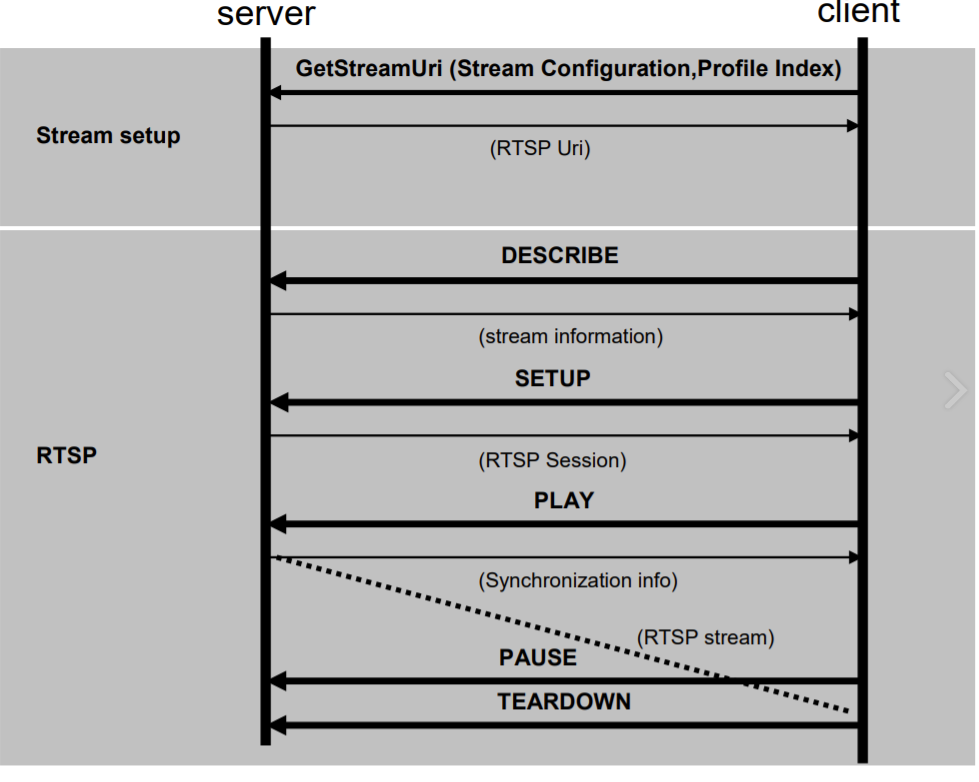
- It has 11 instruction.
-
OPTION: Request a supported method from the server.
(ex. Response: DESCRIBE, SETUP, PLAY, PAUSE, TEARDOWN, OPTIONS)
- DESCRIBE: Request media information. The response comes in the form of SDP.
- SETUP: Request a definition of media information delivery method(session number, etc)
- PLAY: Play the media.
- PAUSE: Pause the media.
- RECORD: Record the media.
- ANNOUNCE: Request real-time media description update.
- TEARDOWN: End media session.
- GET_PARAMETER: Request the parameter values.
- SET_PARAMETER: Set the parameter values.
- REDIRECT: Request the server that should move.
-
H.264
H.264란?
- Standard of Video Compression
- = AVC(Advanced Video Coding), MPEG-4 part 10
특징
- Based on block unit motion compensation.
- Very high data compression rate. The transmission speed is 60% faster than the MPEG-2.
- MPEG-1: Maximum resolution is 352*288
- MPEG-2: Maximum resolution is 1920*1152
- MPEG-4: It has a similar image quality with MPEG-2 but bandwidth is low.
- But, encoding time is increased compared to before.
Profile & Level
-
Profile: It allows users to use only certain technologies depending on the area of use.

ex) Baseline: Low power, low resolution, low delay
Main: High compression rate using B Picture -
Level: It allows detailed settings for each profile.
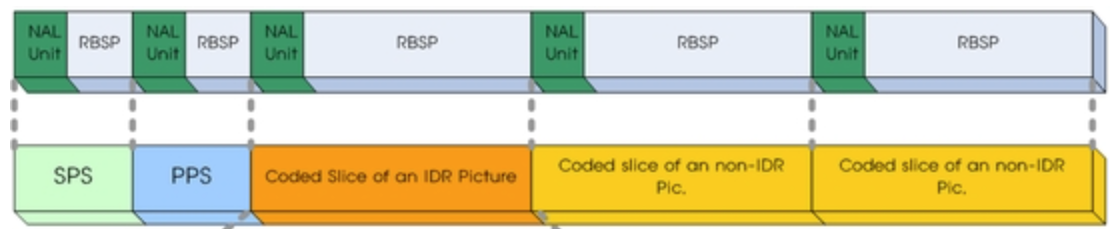
Stream 구조
-
NAL (Network Abstraction Layer): NAL unit + Payloads,
Since H.264 was developed from the beginning for network transmission, it is composed of NAL for efficient transmission.
- RBSP: Raw Byte Sequence Payload
- SPS (Sequence Parameter Set): Contain parameter data like Profile, level, resolution, etc.
- PPS (Picture Parameter Set): Similar with SPS, but contains more specific data.
- Coded Slice of an IDR (or non-IDR) Pic: Image data
- I-slice: Frame that contains all of data.
- P-slice: Frame with motion prediction data referring to the previous data.
- B-slice: Frame with motion prediction data referring to the previous and next data.
H.264 vs H.265
-
H.264 use 1616 pixel macro block, but H.265 use 6464 pixel macro block.
→ Higher encoding efficiency.
- Better intra frame prediction. H.264 allows only 9 motion direction, but H.265 allows 33 motion direction.
- But, H.265 is not supported everywhere.
